Stock register format
Keep a running record of one item: received, issued, lost and balance. Fill it online and print, or download a blank one. Free, no signup.
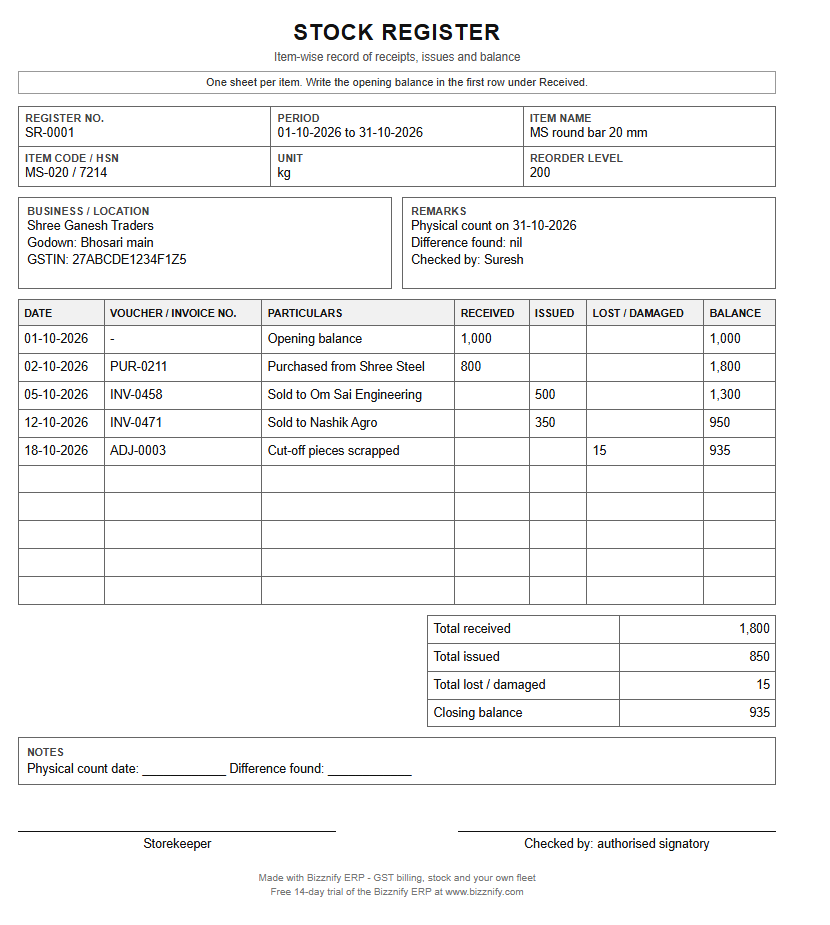
Free stock register for one item. Type the opening balance, then one row for each receipt, issue or loss. The balance after every row is worked out for you. Then print, or Print → "Save as PDF". Nothing you type is stored or sent.
STOCK REGISTER
Item-wise record of receipts, issues and balance
| Date | Voucher / invoice no. | Particulars | Received | Issued | Lost / damaged | Balance |
|---|
| Total received | 0 |
| Total issued | 0 |
| Total lost / damaged | 0 |
| Closing balance | 0 |
Storekeeper
Signature
Checked by
Authorised signatory
Made with Bizznify ERP · GST billing, stock and your own fleet · Free 14-day trial at www.bizznify.com
Blank format, free, no signup: PDF Excel (with formulas) Word
One register per item, by hand? Let the stock keep itself.
- Stock goes up when you buy and down when you sell. No second entry.
- Stock per warehouse, with low-stock alerts to show what to reorder.
- Batch, serial number and bin, and stock audits to match the shelf with the system.
What a stock register is
A stock register is a running record of one item: what you had at the start, what came in, what went out, what was lost, and what is left. A trader keeps one page per item, or one sheet with a block per item. It is how you answer "how much do I have?" without walking the godown, and how you spot theft or loss.
What to write in each row
- Opening balance. The quantity at the start of the period. It is the closing balance of the last period.
- Received. Goods bought, returned by a customer, or moved in from another godown. Write the purchase bill or voucher number.
- Issued. Goods sold or sent out. Write the invoice or challan number.
- Lost / damaged. Goods lost, stolen, destroyed, written off or given as a gift or free sample. Write the reason in the particulars.
- Balance. Opening + received - issued - lost. Check it with a real count from time to time and note any difference.
Does GST require it?
Yes, for most businesses. Rule 56 of the CGST Rules asks a registered person (other than one in the composition scheme) to keep accounts of stock for the goods received and supplied. They show the opening balance, the receipts, the supplies, goods lost, stolen, destroyed, written off or given as gifts or free samples, and the closing balance. The records must be kept at your place of business and shown to the tax officer on request. Ask your CA which records apply to your business.
Source: Rule 56, CGST Rules 2017 (CBIC). Last checked 31 October 2026. Not tax advice.
Stock register, stock ledger and stock report
| Name | What it is |
|---|---|
| Stock register | The running record of one item: received, issued, balance. This page. |
| Stock report | All items in one list on one date, with quantity and value. Made from the registers. |
| Godown-wise stock | The same item split by place, when you have more than one godown or branch. |
स्टॉक रजिस्टर कैसे भरें (हिंदी में)
- दुकान या कंपनी का नाम, गोदाम और अवधि लिखें।
- माल का नाम, कोड और इकाई (किलो, पीस, लीटर) भरें।
- शुरुआती बचा माल (ओपनिंग बैलेंस) लिखें। यह पिछली अवधि का आख़िरी बचा माल है।
- माल आए तो "आया" में मात्रा और ख़रीद बिल का नंबर लिखें।
- माल बिके या गया तो "गया" में मात्रा और इनवॉइस या चालान नंबर लिखें।
- माल खोया, ख़राब हुआ या फेंका गया तो "खोया / ख़राब" में लिखें और कारण बताएँ।
- हर लाइन के बाद बचा माल = शुरुआती + आया - गया - खोया। कभी-कभी असली गिनती से मिलाएँ।
खाली स्टॉक रजिस्टर मुफ़्त डाउनलोड करें: Excel, Word और PDF।
Stop keeping stock on paper
Stock moves by itself
A purchase adds stock and an approved sale takes it out. No second entry.
Stock per warehouse
See the quantity of each item in every warehouse, with low-stock alerts.
Batch, serial and bin
Track stock by batch, serial number and bin where you need to.
Stock value
Stock is valued in first-in first-out order, so cost of goods sold follows the sale.
Questions, answered.
What is a stock register?
A stock register is a running record of one item: the opening balance, what came in, what went out, what was lost or damaged, and the balance after each entry.
How is the stock balance worked out?
Balance = opening balance + received - issued - lost or damaged. The sheet on this page works it out after every row.
Is a stock register needed under GST?
Rule 56 of the CGST Rules asks a registered person (other than one in the composition scheme) to keep accounts of stock for goods received and supplied: opening balance, receipts, supplies, goods lost, stolen, destroyed, written off or given as gifts or free samples, and the closing balance. Ask your CA which records apply to your business.
Can I download the stock register in Excel or Word?
Yes. The blank register is free in PDF, Excel and Word, with no signup. In the Excel file write the opening balance as the first row under Received. The balance column and the totals work by themselves.
Can Bizznify keep my stock?
Yes. Stock goes up with a purchase and down with an approved sale. You can see stock per warehouse, set low-stock levels, and run a stock audit to match the shelf with the system.
Related
Sales, stock, fleet and books. Finally connected.
Start your 14-day free trial today. No card needed.