E-way bill format (details sheet)
Get every e-way bill detail ready: goods, tax, vehicle and transporter. Fill it online and print, or download a blank one. Free, no signup.
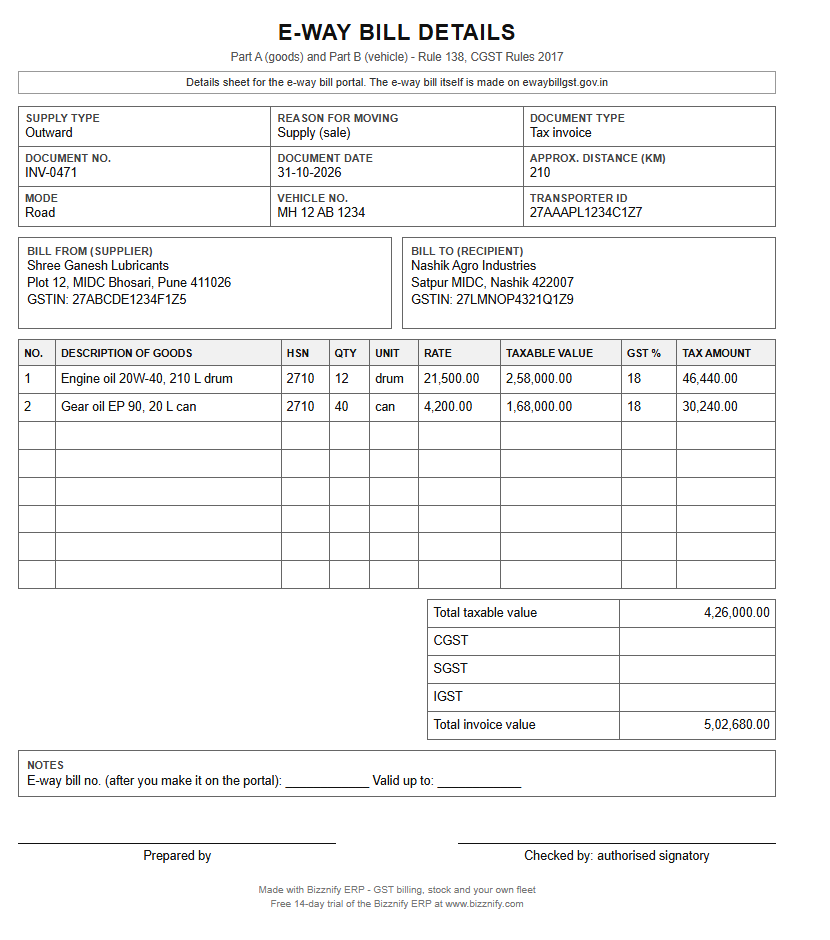
This is a details sheet: it holds everything you type on the e-way bill portal (Part A and Part B). The e-way bill itself is made on the GST portal. Click any field to type; values add up by themselves. Then print, or Print → "Save as PDF". Nothing you type is stored or sent.
E-WAY BILL DETAILS
Part A (goods) and Part B (vehicle) · Rule 138, CGST Rules 2017
| Product / description | HSN | Qty | Unit | Rate ₹ | Taxable value ₹ | GST % |
|---|
Part B: transport
Prepared by
Signature
Checked by
Authorised signatory
Made with Bizznify ERP · GST billing, stock and your own fleet · Free 14-day trial at www.bizznify.com
Blank format, free, no signup: PDF Excel (with formulas) Word
Typing the same invoice, vehicle and LR again and again?
- Invoice, delivery challan, vehicle, driver and LR are kept in one place, so these details are already there.
- Invoice numbers run in order by themselves.
- Coming soon: e-way bill from Bizznify.
What an e-way bill is
An e-way bill is an electronic permit that must be made on the GST portal before goods move in a vehicle, when the consignment value is above ₹ 50,000. The details come from your invoice, bill of supply or delivery challan. There is no paper form to fill: the "format" is the list of details the portal asks for.
This sheet lists those details so you can collect them first, hand them to the person who enters them, and keep a copy. It is not the e-way bill itself.
Part A and Part B
| Part | What it holds | Who usually fills it |
|---|---|---|
| Part A | Supplier and recipient (name, GSTIN, PIN code), document number and date, items with HSN, quantity and taxable value, tax amounts, approx. distance. | The seller, from the invoice or challan. |
| Part B | Mode of transport and the vehicle number (or the transport document number for rail, air or ship). | The seller, or the transporter if the seller gives them the Part A. |
When it is needed
- Value: the consignment is worth more than ₹ 50,000. The limit for movement inside one state can differ by state, so check your state.
- Moved in a vehicle as a supply, a return, a job work movement or for any other reason.
- Before the goods leave. Part A and Part B must both be done for the bill to be valid on the road.
- Some goods and short moves are exempt. Check the list in Rule 138 and your state rules, or ask your CA.
How long it is valid
For ordinary goods the e-way bill is valid for about 1 day for every 200 km of distance, counted from the time Part B is entered. For over-dimensional cargo it is about 1 day for every 20 km. If the truck cannot reach in time, the bill can be extended on the portal, within a short window around the expiry. Rules change from time to time, so check the portal before you rely on the exact days.
Source: Rule 138, CGST Rules 2017 (CBIC) and the e-way bill portal ewaybillgst.gov.in. Last checked 31 October 2026. This page is general guidance, not tax advice: confirm with your CA.
ई-वे बिल की जानकारी कैसे तैयार करें (हिंदी में)
ई-वे बिल GST पोर्टल पर बनता है। यह शीट वही जानकारी पहले से तैयार रखने के लिए है।
- सप्लाई का प्रकार (आउटवर्ड या इनवर्ड) और माल भेजने का कारण चुनें।
- बिल का प्रकार (टैक्स इनवॉइस, चालान वग़ैरह), नंबर और तारीख़ लिखें।
- भेजने वाले और पाने वाले का नाम, GSTIN और पिन कोड भरें।
- हर माल की लाइन भरें: नाम, HSN कोड, मात्रा, इकाई, रेट और टैक्स।
- पार्ट B में गाड़ी का नंबर, ट्रांसपोर्टर का नाम और ID, और बिल्टी (LR) नंबर लिखें।
- माल का मूल्य ₹ 50,000 से ज़्यादा हो तो माल निकलने से पहले पोर्टल पर ई-वे बिल बनाएँ।
- बनने के बाद 12 अंकों का नंबर इस शीट पर लिख लें।
खाली शीट मुफ़्त डाउनलोड करें: Excel, Word और PDF।
Related documents for moving goods
Delivery challan
Goods that move without a sale. Make a challan.
LR / bilty
The transporter's receipt that travels with the goods. Make an LR.
GST invoice
The document the e-way bill is based on. Make an invoice.
Questions, answered.
What is an e-way bill?
An e-way bill is an electronic permit made on the GST portal for goods that move in a vehicle, when the consignment value is above ₹ 50,000. It is based on your invoice, bill of supply or delivery challan.
Is there a paper e-way bill format to download?
No. The e-way bill is made online on the portal. This page gives a details sheet with every field the portal asks for, so you can get the data ready, share it with the person who enters it, and keep a copy.
What are Part A and Part B of an e-way bill?
Part A holds the supplier, recipient, document and goods details. Part B holds the transport details, mainly the vehicle number. Both are needed before the e-way bill is valid for the road.
How long is an e-way bill valid?
For ordinary goods it is about 1 day for every 200 km, and for over-dimensional cargo about 1 day for every 20 km. It can be extended on the portal. Rules change from time to time, so check the portal for the current days.
Can Bizznify make e-way bills?
Not yet, it is coming soon. Today Bizznify keeps the invoice, delivery challan, vehicle, driver and LR in one place, so the details are already there when you enter them on the portal.
Can I download the e-way bill details sheet in Excel or Word?
Yes. The blank sheet is free in PDF, Excel and Word, with no signup. The Excel file works out the taxable value, the tax and the total invoice value by itself.
Related
Sales, stock, fleet and books. Finally connected.
Start your 14-day free trial today. No card needed.