LR / bilty format
Fill in a lorry receipt and print the copies, or download a blank one. Free, no signup, no printed bilty book.
Free LR / bilty format. Click any field to type, then print the copies, or Print → "Save as PDF". Nothing you type is stored or sent.
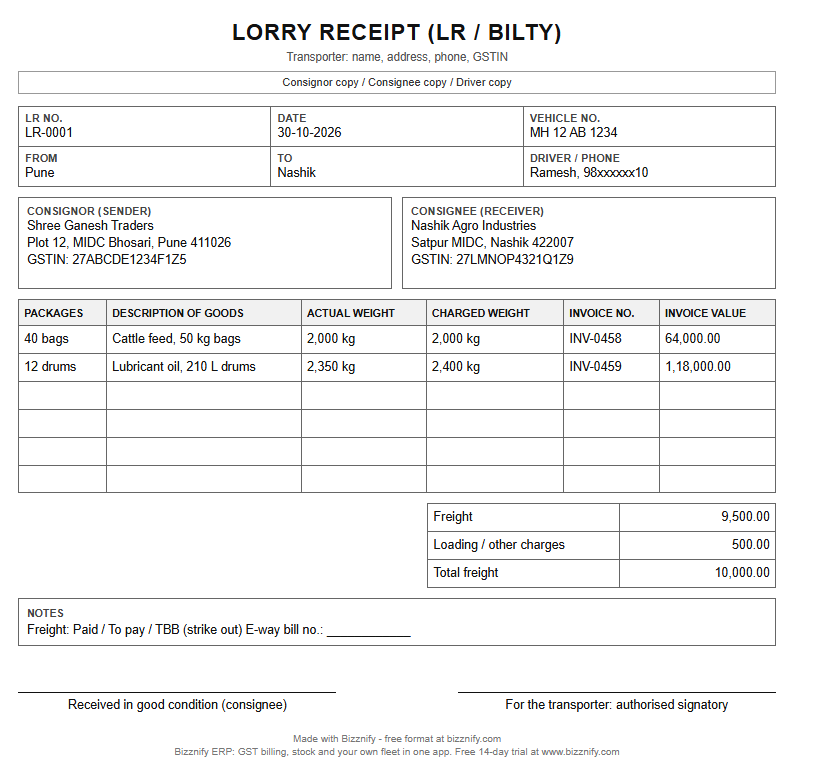
LORRY RECEIPT (LR / Bilty)
| Packages | Description of goods | Actual weight | Charged weight | Invoice no. | Invoice value ₹ |
|---|
| Freight ₹ | |
| Other charges ₹ | |
| Total | ₹ 0.00 |
Received in good condition
Consignee signature
For the transporter
Authorised signatory
Made with Bizznify · free format at bizznify.com
Blank format, free, no signup: PDF Excel (with formulas) Word
Still buying printed bilty books? Make every LR from your dispatch.
- LR numbers run in order by themselves.
- Party, goods, vehicle and driver come from the dispatch; nothing is typed twice.
- One trip, many drops: print a trip manifest. Share the PDF on WhatsApp.
What goes on an LR / bilty
- LR number and date, and the transporter's name, address and GSTIN.
- From and to, the vehicle number and the driver.
- Consignor and consignee: who sends and who receives, with GSTIN.
- Goods: packages, description, actual and charged weight, invoice number and value.
- Freight: amount and terms (paid, to pay or TBB), and the e-way bill number when needed.
- Signatures: the transporter at booking, the consignee at delivery ("received in good condition").
Freight terms: paid, to pay, TBB
| Term | Who pays the freight | When |
|---|---|---|
| Paid | Consignor (sender) | At booking |
| To pay | Consignee (receiver) | At delivery |
| TBB (to be billed) | The party named on the LR | Later, on a freight bill |
Actual weight vs charged weight
Actual weight is what the goods weigh. Charged weight is the weight the freight is billed on. It can be higher: light but bulky goods, or a minimum charge per booking.
बिल्टी कैसे बनाते हैं (हिंदी में)
- ट्रांसपोर्ट कंपनी का नाम, पता और GSTIN लिखें।
- बिल्टी (LR) नंबर, तारीख और गाड़ी नंबर भरें।
- माल कहाँ से कहाँ जा रहा है, ड्राइवर का नाम और फ़ोन लिखें।
- माल भेजने वाला (कंसाइनर) और पाने वाला (कंसाइनी), दोनों का नाम, पता और GSTIN भरें।
- पैकेज, माल का विवरण, असली वज़न, चार्ज्ड वज़न, बिल नंबर और कीमत लिखें।
- भाड़ा और शर्त लिखें: पेड (भेजने वाले ने दिया), टू पे (पाने वाला देगा) या TBB (बाद में बिल होगा)।
खाली बिल्टी फ़ॉर्मेट मुफ़्त डाउनलोड करें: Excel, Word और PDF। छपी हुई बिल्टी बुक की ज़रूरत नहीं।
Stop writing LRs by hand
LR from the dispatch
Customer, goods, quantity, vehicle and driver are already on the dispatch. The LR prints from it.
Trip manifest
One trip, many drops: print a manifest with every dispatch on the trip.
Share on WhatsApp
Send the LR as a PDF from your phone's share menu.
Delivery and shortage
Record proof of delivery and the received quantity; shortages are tracked.
Trip cost and profit
Freight, diesel, tolls and driver expenses per trip.
Vehicle papers
Insurance, fitness, permit and PUC expiry alerts before the truck is stopped.
E-way bill from Bizznify. The invoice, the vehicle number and the LR are already in Bizznify, so you will not type them again on the e-way bill portal.
Questions, answered.
What is an LR or bilty?
An LR (lorry receipt), also called bilty or GR (goods receipt), is the document a transporter gives when goods are loaded. It names the consignor, consignee, vehicle, goods, weight and freight.
What does freight paid, to pay and TBB mean?
Paid: the consignor paid the freight at booking. To pay: the consignee pays at delivery. TBB (to be billed): freight goes on a later bill to the party.
Can Bizznify print LRs automatically?
Yes. Each dispatch prints its LR from the data already entered, and a trip prints a manifest of all its dispatches. You can share the PDF on WhatsApp.
Is the e-way bill made automatically?
E-way bill is coming soon. In the free LR format above you can type the e-way bill number by hand.
Can I download the bilty format in Excel or Word?
Yes. The blank LR / bilty format is free in PDF, Excel and Word, with no signup. Print as many as you need instead of buying printed bilty books.
Related
Sales, stock, fleet and books. Finally connected.
Start your 14-day free trial today. No card needed.